Two ways to use AethonVoice. Pick the one that fits.
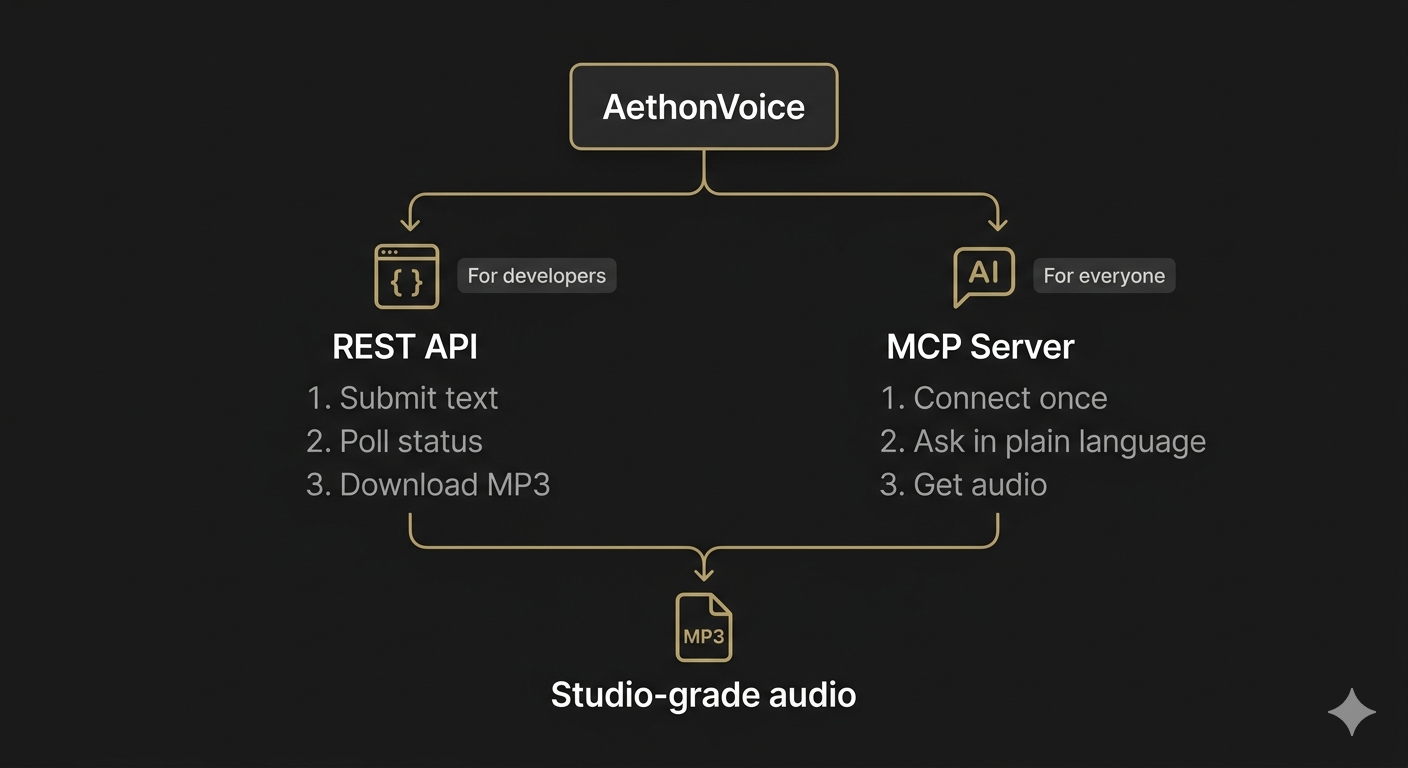
Base URL: https://api.aethon.lab.ai/v1. Two ways to get results: poll for status, or let us call your webhook when it's ready. Two modes to submit: single job via POST /submit, or batch via POST /batch-submit for many items in one request — see Batch Processing below.
Submit a job, check back periodically, download when ready. Simple and reliable.
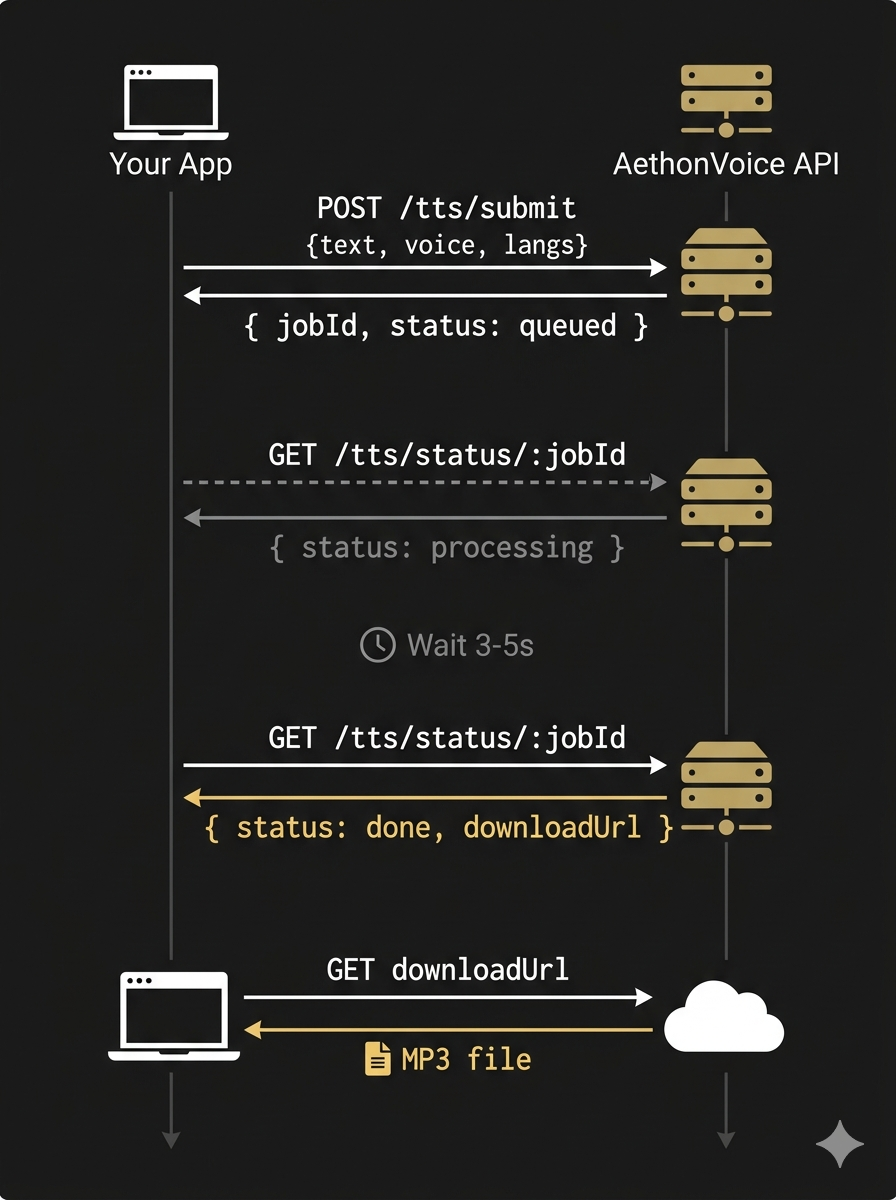
1. POST /submit                →  { batchId, status: "queued" }
2. GET  /batch-status/:batchId →  { status: "processing" }
3. GET  /batch-status/:batchId →  { status: "done", items: { item0: { downloadUrl: "..." } } }
4. Download MP3 from downloadUrl (no auth needed)Provide a callbackUrl and we'll POST the results to your server when the job completes. No polling needed.
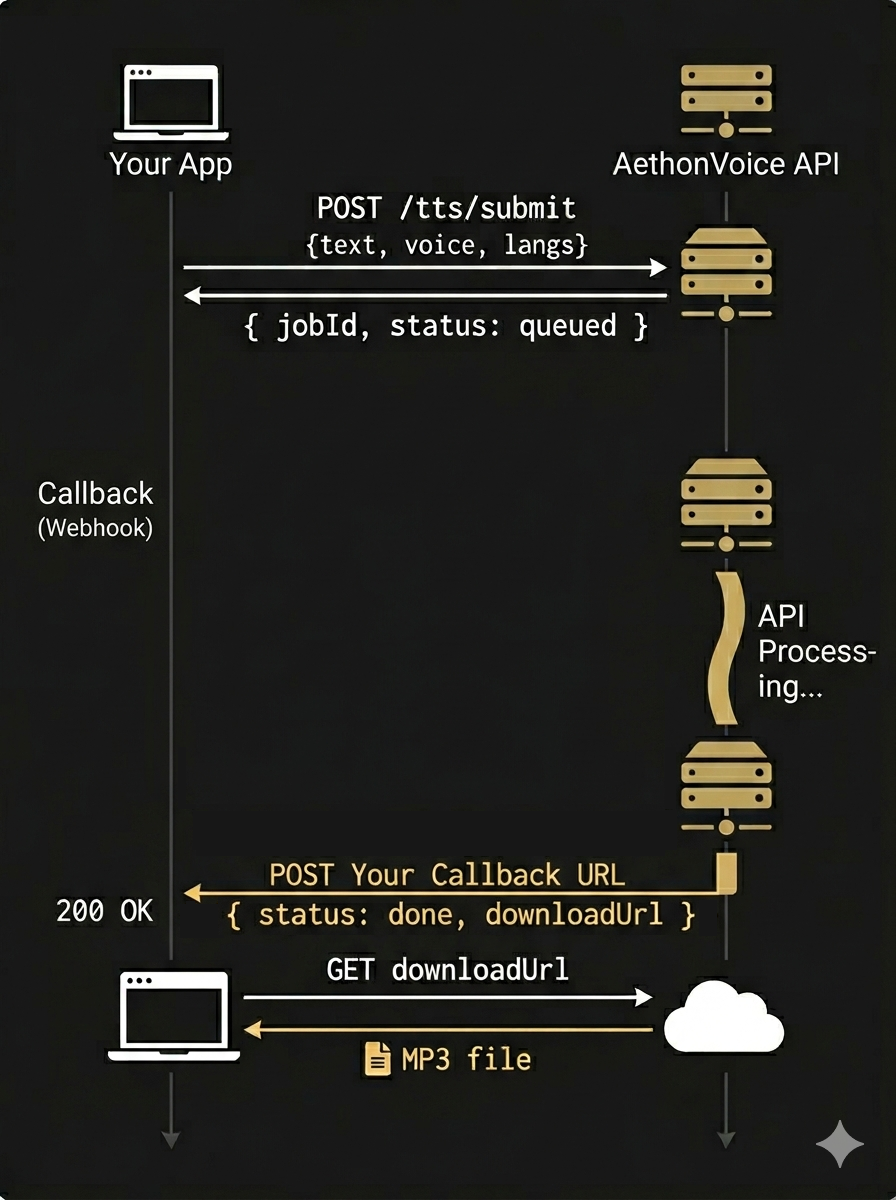
1. POST /submit  →  { batchId, status: "queued" }
   body: { text, voice, langs, callbackUrl: "https://your-server.com/webhook" }

2. (your app does other work — no polling needed)

3. POST your callbackUrl ← AethonVoice calls you
   {
     "batchId": "Xk9mP2qR7vNw",
     "status": "done",
     "items": {
       "item0": { "status": "done", "downloadUrl": "https://storage.googleapis.com/...", "durationMs": 2100 }
     },
     "callbackRef": null
   }

4. Download MP3 from downloadUrl (no auth needed)
Best for batch jobs and server-to-server integrations. You can still poll GET /batch-status/:batchId as a fallback. Your endpoint should answer 2xx within 10 seconds; failed deliveries are retried (7 attempts over ~9 hours).
If generation fails, you still receive a callback — the payload carries a top-level error string so you don't have to walk the items map:
{
  "batchId": "Bt9xK2pL...",
  "status": "error",
  "error": "All 3 items failed",
  "items": { /* per-item status + error */ }
}
Credits are only debited for items that successfully returned audio — failed items are never charged.
Sign up and create an API key from your dashboard. Keys are issued in the form av_live_<32-bytes-base64url> and shown only once at creation — we store a SHA-256 hash, never the raw key. Send it as Authorization: Bearer <key> on every request (the X-API-Key header is also accepted).
curl -X POST https://api.aethon.lab.ai/v1/submit \
  -H "Content-Type: application/json" \
  -H "Authorization: Bearer YOUR_API_KEY" \
  -d '{
    "text": "Welcome to AethonVoice.",
    "voice": "aris",
    "langs": ["en-US"]
  }'
Response:
{
  "batchId": "Xk9mP2qR7vNw",
  "status": "queued",
  "gpu": "L4"
}curl https://api.aethon.lab.ai/v1/batch-status/Xk9mP2qR7vNw \
-H "Authorization: Bearer YOUR_API_KEY"Response (when complete):
{
  "batchId": "Xk9mP2qR7vNw",
  "status": "done",
  "items": {
    "item0": {
      "status": "done",
      "downloadUrl": "https://storage.googleapis.com/...",
      "durationMs": 2100
    }
  }
}The downloadUrl is a signed URL. Download it directly — no authentication header needed. It is valid for 7 days; the file is deleted after that, so keep a copy if you need it longer.
All paths are relative to https://api.aethon.lab.ai/v1.
| Endpoint | Method | Description |
|---|---|---|
/submit |
POST | Submit single TTS job |
/batch-submit |
POST | Submit batch of TTS items |
/status/:batchId |
GET | Same response as /batch-status (kept for single jobs) |
/batch-status/:batchId |
GET | Poll batch status with per-item progress |
| Status | Meaning |
|---|---|
queued |
Job received, waiting for GPU worker |
processing |
Text is being prepared and audio generated (items report preparing / generating) |
done |
Audio ready — downloadUrl included |
error |
Failed — each item carries error: { stage, message } |
partial |
(Batch only) Some items succeeded, some failed |
1 credit = 1 second of generated audio, rounded up per job. Charges are always based on the actual duration returned — never on your input text length — and failed items are never debited.
Before we queue a job, we run a quick pre-flight estimate based on character count and language speaking rate. If the estimate exceeds your available balance by more than a 30-second tolerance, the request is rejected with 402 Payment Required before any work is done:
{
  "error": "Not enough credit."
}
A 30-second tolerance means borderline jobs are allowed through and may end the session with a small negative balance — the next top-up restores you automatically.
| Code | Meaning | When |
|---|---|---|
400 |
Bad Request | Missing/invalid field (text, voice, langs, accent, register, speed) or a bad language tag |
401 |
Unauthorized | Missing Authorization header, or key invalid/revoked |
402 |
Payment Required | Estimated duration exceeds balance + 30s tolerance |
404 |
Not Found | Unknown batchId (or one that belongs to another account) |
429 |
Rate Limited | Too many requests (not enforced yet) |
502 |
Bad Gateway | The job could not be started; nothing was charged — safe to submit again |
Submit multiple items in one request. Each item can have different text, voice, and languages — useful for dubbing, dataset generation, or multi-speaker scripts.
curl -X POST https://api.aethon.lab.ai/v1/batch-submit \
  -H "Content-Type: application/json" \
  -H "Authorization: Bearer YOUR_API_KEY" \
  -d '{
    "items": [
      { "key": "word-01", "text": "สวัสดีครับ", "voice": "aris", "langs": ["th"] },
      { "key": "word-02", "text": "こんにちは", "voice": "lyra", "langs": ["ja"] },
      { "key": "word-03", "text": "Auf Wiedersehen", "voice": "nolan", "langs": ["de"] }
    ],
    "callbackUrl": "https://your-server.com/webhook"
  }'
Response:
{
  "batchId": "Bk8nQ3rS6uMx",
  "status": "queued",
  "gpu": "L4",
  "itemCount": 3
}
Poll GET /batch-status/:batchId to see per-item progress. Start downloading completed items before the full batch finishes. If you supplied callbackUrl, we POST the final payload to your server — no polling needed.
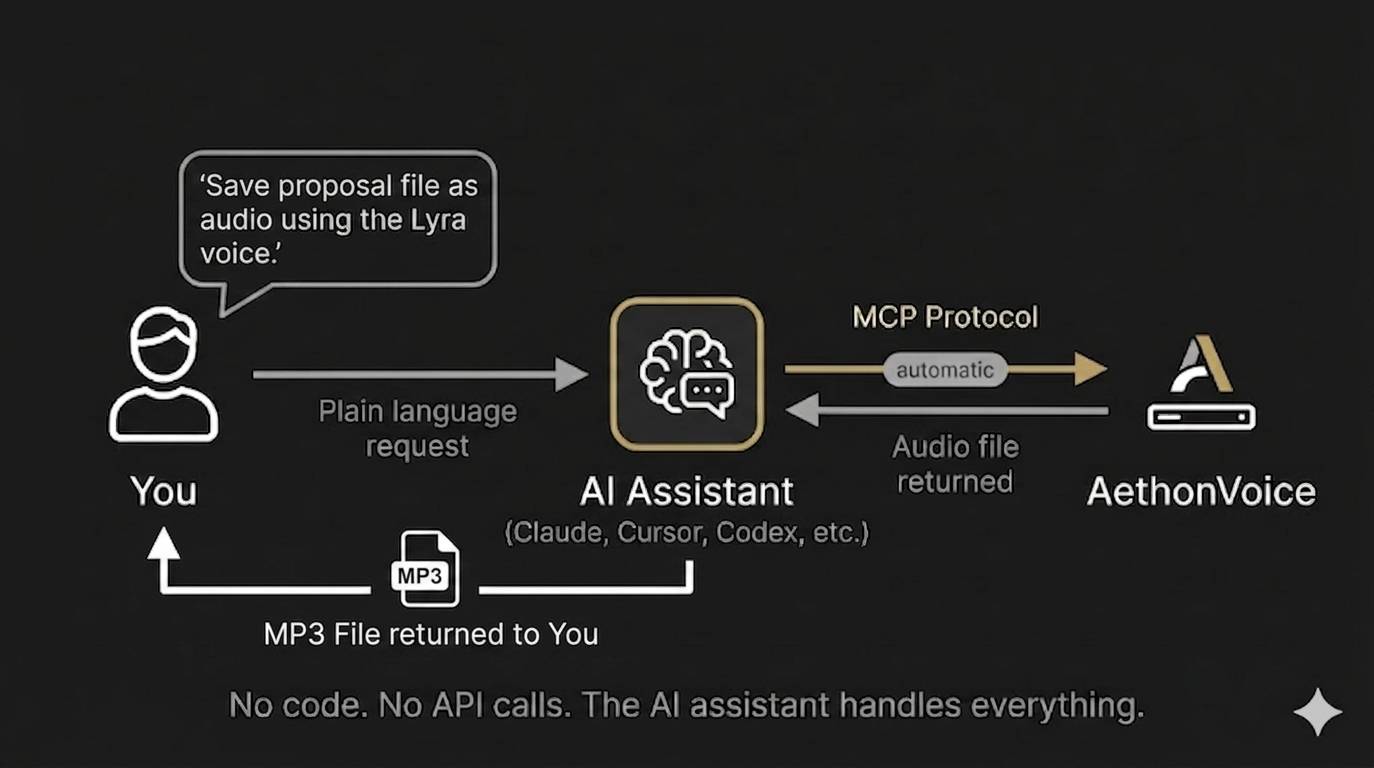
No code required. AethonVoice will work as a tool inside any MCP-compatible AI assistant.
An AI assistant that supports MCP (Claude Code, Codex, Coworks, Cursor, Windsurf, and others)
An AethonVoice API key
A one-time MCP Server connection setup
Once connected, you talk to your AI assistant in plain language:
"Generate Thai pronunciation for สวัสดีครับ using the Aris voice"
The assistant calls AethonVoice, generates the audio, and returns a download link.
"Read this paragraph aloud with the Lyra voice"
Paste any text. The assistant sends it to AethonVoice and gives you the MP3.
"Create audio for this blog post in French"
Long-form content works too. The assistant handles the submission and polling automatically.
"Pronounce this Japanese word: ありがとうございます"
Quick pronunciation lookups — useful for language learning, content creation, or accessibility.
Write text the way you would for a human reader, in any of the 19 supported languages. Numbers, dates, times, prices, percentages, units and phone numbers are read aloud correctly for each language ($2.50, 12:30, 24 GB, 68.5%). A line break becomes a short pause (0.7–1.1 s). Long text is fine — it is split internally and joined into one MP3.
List every language in the text in langs; the first one is the main language. The service finds which part is which language in one of two ways.
Languages are recognized by their writing system, so this works whenever each language in langs has its own: Thai + English, Japanese + English, Russian + English, Arabic + French, Korean + Chinese …
| Writing system | Languages |
|---|---|
| Latin | en-US, en-GB, es, fr, de, it, pt, id, ms, vi, tr |
| Thai | th |
| Cyrillic | ru |
| Arabic | ar |
| Hangul | ko |
| Kana | ja |
| Chinese characters | zh-CN, zh-TW, yue (and Japanese kanji) |
Two languages from the same row (Spanish + English, Chinese + Japanese kanji) look the same to the service: all of that text is treated as the language listed first. Use tags for the other one.
Wrap a part in <code>…</code> to say its language. Tags always win and are removed before speech.
La reunión se llama <en>Weekly Sync</en> y empieza a las 9.<en> means the English you listed (en-US or en-GB), <zh> the Chinese you listed; otherwise en-US / zh-CN.langs, and tags must be closed and not nested — otherwise 400.24 GB in a Thai sentence is read in Thai). To have a number read in another language, put it inside a tag.Put a tag in square brackets where the voice should make a sound instead of words. The voice makes it in its own character, in any language.
| Tag | Sound |
|---|---|
[laughter] | A laugh |
[sigh] | A sigh |
[surprise-ah] [surprise-oh] [surprise-wa] [surprise-yo] | A surprised “ah!”, “oh!”, “wa!”, “yo!” |
[question-ah] [question-oh] [question-ei] [question-yi] [question-en] | A questioning sound |
[confirmation-en] | An agreeing “uh-huh” |
[dissatisfaction-hnn] | A displeased “hnn” |
I told him the whole story, [laughter] and he still didn't believe me. [sigh]Write tags exactly as listed, in lowercase; other bracketed text is read as ordinary text. For a pause, use a line break.
| Voice | ID | Gender | Character |
|---|---|---|---|
| Aris | aris |
Male | Warm, steady, authoritative |
| Nolan | nolan |
Male | Clear, friendly, upbeat |
| Lyra | lyra |
Female | Gentle, expressive, nuanced |
| Senna | senna |
Female | Calm, articulate, professional |
| Field | Required | Description |
|---|---|---|
accent |
No | local (default): the whole text is spoken as a speaker of the main language — foreign words carry that accent, smooth and fastest. native: each language with its own native pronunciation. |
register |
No | formal (default) or casual: how times and prices are read where a language has both forms (e.g. 17:30 → “five thirty p.m.” / “five thirty”). |
withTimestamps |
No | true adds timestampsUrl: a JSON file with the start/end time of every word, each pointing back to its position in your original text (e.g. “two thousand twenty-five” → 2025). Great for karaoke-style highlighting and subtitles. No extra charge. |
callbackUrl |
No | Webhook URL we POST the result to when the job finishes. |
callbackRef |
No | Your own reference string, returned in the webhook payload. |
speed |
No | Batch items only: speaking rate 0.5–2.0 (default: natural). |
Codes are case-insensitive; en and zh also work (= en-US, zh-CN).
| Code | Language | Code | Language |
|---|---|---|---|
en-US | English (US) | vi | Vietnamese |
en-GB | English (UK) | id | Indonesian |
zh-CN | Mandarin (Simplified) | ms | Malay |
zh-TW | Mandarin (Traditional) | ar | Arabic |
yue | Cantonese | ru | Russian |
th | Thai | tr | Turkish |
ja | Japanese | de | German |
ko | Korean | fr | French |
es | Spanish | it | Italian |
pt | Portuguese (Brazilian) |
Hindi, Bengali, Urdu and Persian are coming later.
| Parameter | Value |
|---|---|
| Format | MP3 |
| Bitrate | 96 kbps |
| Sample rate | 24 kHz |
| Channels | Mono |
| Download URL expiry | 7 days (the file is deleted after that) |
| Word timestamps | Optional JSON file (withTimestamps) |
These numbers look lower than music streaming, but they're optimal for speech. Human speech tops out at ~8 kHz — well within the 12 kHz Nyquist limit of a 24 kHz sample rate. 100% of the speech signal is captured.
At 96 kbps MP3, the compressed audio is perceptually transparent for speech — indistinguishable from the uncompressed original in listening tests. The result: smaller files, faster downloads, identical quality.
For context, OpenAI TTS also outputs at 24 kHz. This reflects the TTS research consensus that 24 kHz is the sweet spot for speech synthesis. Higher sample rates add file size with zero audible benefit for voice.
Download URLs are signed — no authentication needed to download. The cryptographic signature carries access. URLs cannot be guessed or enumerated.
This page covers the essentials. For complete API reference including all request/response schemas, error codes, rate limits, and advanced usage:
Read the Full API DocsStudio-grade TTS in minutes. Choose your path.
Use AethonVoice through any MCP-compatible AI assistant. No code needed.
Set Up MCP Soon Claude Code, Cursor, Windsurf & more